
Angular Mobile Badge
Angular Mobile Badge - Bootstrap 4 & Material Design
Badge can be used to create gentle notifications for the user. For example, in the counter like a project in social media.
Basic example
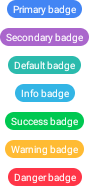
Basic example for MDBBadge component - colorful badges in main MDB palette
Android
iOS
        <StackLayout>
          <MDBBadge class="mdb-badge-primary m-y-5"><Label text="Primary badge"></Label></MDBBadge>
          <MDBBadge class="mdb-badge-secondary m-y-5"><Label text="Secondary badge"></Label></MDBBadge>
          <MDBBadge class="mdb-badge-default m-y-5"><Label text="Default badge"></Label></MDBBadge>
          <MDBBadge class="mdb-badge-info m-y-5"><Label text="Info badge"></Label></MDBBadge>
          <MDBBadge class="mdb-badge-success m-y-5"><Label text="Success badge"></Label></MDBBadge>
          <MDBBadge class="mdb-badge-warning m-y-5"><Label text="Warning badge"></Label></MDBBadge>
          <MDBBadge class="mdb-badge-danger m-y-5"><Label text="Danger badge"></Label></MDBBadge>
        </StackLayout>
Angular Mobile Badge - API
In this section you will find informations about badge and its required modules and available inputs, outputs, methods and events.
Modules used
In order to speed up your application, you can choose to import only the modules you actually need, instead of importing the entire MDB Angular Mobile library. Remember that importing the entire library, and immediately afterwards a specific module, is bad practice, and can cause application errors.
    // MDB Angular Mobile Free
    import { MdbBadgeModule } from 'mdb-angular-mobile'