Topic: MDBDataTable Material Design entries input: Not working without custom css
Expected behavior
I expected the entries input to work just as the example.
Actual behavior
The layout was broken and the list of entries was not showing.
Resources (screenshots, code snippets etc.)
I had to make a custom stylesheet with:
.select-dropdown { margin-top: 0!important;}

.caret { margin-top: 0!important;}

.dropdown-content { display: block !important;}

Hi @be.careSA,
Do you mean about this problem? 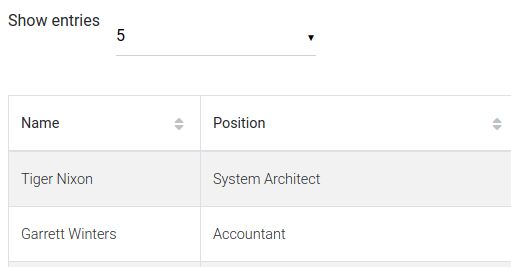
the problem will be fixed in the next release, this Monday. It will look like this:

Thank you for report the bug, and we apologise for the problems.
Best, Konrad.

I just checked and the layout problem is fixed. But it is still not possible to toggle the dropdown input without adding:
.dropdown-content { display: block !important }
Konrad Stępień staff commented 2 years ago
Hi @be.careSA,
Is it possible for you to show the problem in visual form or give to me some code? When checking the component, I do not encounter the above-mentioned problems.
Make you sure that you've got well-imported styles in your project.
You can follow this guide.
Best, Konrad.
Open
- User: Pro
- Premium support: Yes
- Technology: React
- MDB Version: 4.18.0
- Device: Laptop
- Browser: Chrome
- OS: Windows
- Provided sample code: No
- Provided link: No