Topic: Dropdown with react router

Expected behavior
to property for MDBDropdownItem
OR
correct styling of Link inside
Actual behavior
MDBDropdownItem has a href prop which reloads a page on click.
AND
Link creates a a element styled as a link (blue and darker blue on hover).
Resources (screenshots, code snippets etc.)
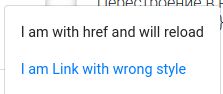

Hi @Roman Mzh,
Thank you very much for your feedback!
I think we should fix this in near future but for now you can use MBDNavLink with link prop.
Look at snippet below.
   <MDBDropdownItem>
          <MDBDropdownToggle caret color='primary'>
            Dropdown
          </MDBDropdownToggle>
          <MDBDropdownMenu>
            <MDBDropdownItem>
              <MDBNavLink link to='#' className='text-dark p-0'>
                Action
              </MDBNavLink>
            </MDBDropdownItem>
            <MDBDropdownItem>
              <MDBNavLink link to='#' className='text-dark p-0'>
                NavLink with props
              </MDBNavLink>
            </MDBDropdownItem>
            <MDBDropdownItem>
              <MDBNavLink link to='#' className='text-dark p-0'>
                Something else here
              </MDBNavLink>
            </MDBDropdownItem>
            <MDBDropdownItem divider />
            <MDBDropdownItem>
              <MDBNavLink link to='#' className='text-dark p-0'>
                Separated link
              </MDBNavLink>
            </MDBDropdownItem>
          </MDBDropdownMenu>
        </MDBDropdownItem>
If there is anything else I could do for you do not hesitate to ask me. I'll be happy to help you.
Best Regards,
Kuba
Answered
- User: Pro
- Premium support: Yes
- Technology: React
- MDB Version: 4.23.0
- Device: pc
- Browser: chrome
- OS: ubuntu 18.04
- Provided sample code: No
- Provided link: No