Topic: Icon in Center in Input Field

Expected behavior
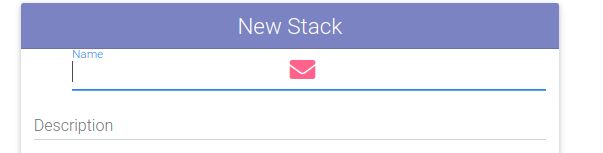
Icon should come on left of Input Field.
Actual behavior
Icon is coming in center of Input Field.
Resources (screenshots, code snippets etc.)
*Code Used*
Screenshot
Status
Open
Specification of the issue
- User: Pro
- Premium support: Yes
- Technology: Vue
- MDB Version: 6.6.0
- Device: laptop
- Browser: Chrome
- OS: Ubuntu
- Provided sample code: No
- Provided link: No
Tags
Related topics
fe_developer pro premium commented 11 months ago
I have used following code: mdb-input class="mb-3 mt-1 ml-3 mr-3" size="lg" icon="envelope" label="Name" v-model="app_name"
Mikołaj Smoleński staff commented 11 months ago
I guess it has connection with the wrapper of the component in your project or other custom classes are applied to icon. Please check in console all styles of icon in input (F12).
In our demo there is a working example: https://vue.mdbootstrap.com/#/forms/inputs
And here is the code:
<mdb-input m="t5" type="text" label="Input with icon" icon="envelope" />Best regards