Topic: Select via API
Hello,
I would like to put the different labels in French. So I go through javascript to create my "select". Unfortunately, I have a graphic problem during creation: the list of options is present.
O1ivier
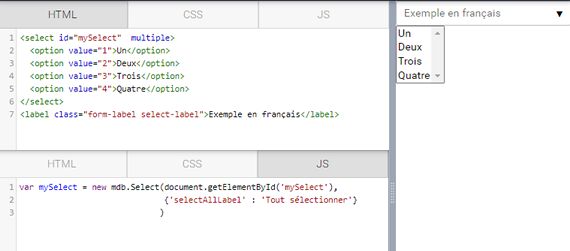
Ps: A simple method is missing to internationalize the different modules of MB5.

Hi there,
I fixed your snippet. In fact, there is no need to use JS since customization is available also with data-attributes. https://mdbootstrap.com/snippets/standard/o1ivier/2478467#html-tab-view
Best regards

What are all the possible values to change the language? I tested this method but only "data-select-all-label" works.
<select class="select" multiple data-filter="true" data-select-all-label="Tout sélectionner" data-search-label="Rechercher..." data-options-selected-label="valeurs sélectionnées" data-no-result-text="Pas de résultat">
o1ivier
Mikołaj Smoleński staff commented 7 months ago
All the possible options are placed in the API tab (section Options) in our documentation: https://mdbootstrap.com/docs/standard/forms/select/
Best regards
O1ivier pro premium priority commented 7 months ago
But, we come back to the first problem.
Magdalena Dembna staff premium commented 7 months ago
Regarding native options showing in a snippet - this component s initialized with Javascript and it takes time to render it. We will try to work on this issue. Best regards, Magdalena
Answered
- User: Pro
- Premium support: Yes
- Technology: MDB 5
- MDB Version: 1.0.0
- Device: PC
- Browser: Chrome
- OS: W10
- Provided sample code: No
- Provided link: Yes