Topic: Autocomplet is not working in Modal

Hi...
I'm trying to use an "input" with autocomplete function inside in a modal but it does not show the list of elements to autocompleted.The autocomplete function only works if it is out of the modal.
This is my HTML code...
<html>
<head>
    <meta name="viewport" content="width=device-width" />
    <title>Modal</title>
</head>
<body>
    <div>
        <button type="button" class="btn btn-primary" data-toggle="modal" data-target="#exampleModal">
            Launch demo modal
        </button>
        <!--Modal-->
        <div class="modal fade ui-front" id="exampleModal" tabindex="-1" aria-labelledby="exampleModalLabel" aria-hidden="true">
            <div class="modal-dialog">
                <div class="modal-content">
                    <div class="modal-header">
                        <h5 class="modal-title" id="exampleModalLabel">Modal title</h5>
                        <button type="button" class="btn-close" data-dismiss="modal" aria-label="Close"></button>
                    </div>
                    <div class="modal-body ui-front">
                        <!--Autocomplete-->
                        <div id="basic" class="form-outline">
                            <input type="text" id="form1" class="form-control" />
                            <label class="form-label" for="form1">Example label</label>
                        </div>
                    </div>
                    <div class="modal-footer">
                        <button type="button" class="btn btn-secondary" data-dismiss="modal">
                            Close
                        </button>
                        <button type="button" class="btn btn-primary">Save changes</button>
                    </div>
                </div>
            </div>
        </div>


    </div>
</body>
</html>


<script src="~/Scripts/jquery-3.4.1.min.js"></script>
<script src="~/Content/MDB-UI-KIT-Pro-Essential-2.0.0/js/mdb.min.js"></script>

<script type="text/javascript">
    const basicAutocomplete = document.querySelector('#basic');
    const data = ['One', 'Two', 'Three', 'Four', 'Five'];
    const dataFilter = (value) => {
        return data.filter((item) => {
            return item.toLowerCase().startsWith(value.toLowerCase());
        });
    };

    new mdb.Autocomplete(basicAutocomplete, {
        filter: dataFilter
    });
</script>
This is a capture of my view...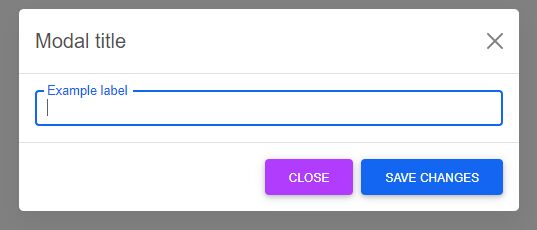

Your script tags should be right before the closing <body> tag, instead of after the closing <html> tag. And the autocomplete initialization should get wrapped in the shown.bs.modal event.
Working snippet - https://mdbootstrap.com/snippets/standard/andrew_ford/2693330#js-tab-view
Yutaka pro premium priority commented 5 months ago
Thank you, it works :)
joelgrondrup pro premium commented 4 months ago
Was also looking for this problem to be solved. Would have been nice to notice in the docs.
Resolved
- User: Pro
- Premium support: Yes
- Technology: MDB 5
- MDB Version: 2.0.0
- Device: PC
- Browser: Chrome
- OS: Windows 10
- Provided sample code: No
- Provided link: No