Topic: Problem with material date input
Expected behavior
Label should move up, even if the input is already filled with a date. Date should be in the following format: dd.mm.yyyy
Actual behavior
Label stays at the place, even if there is already a date inside. Date is in the following format: yyyy-mm-dd
Resources (screenshots, code snippets etc.)
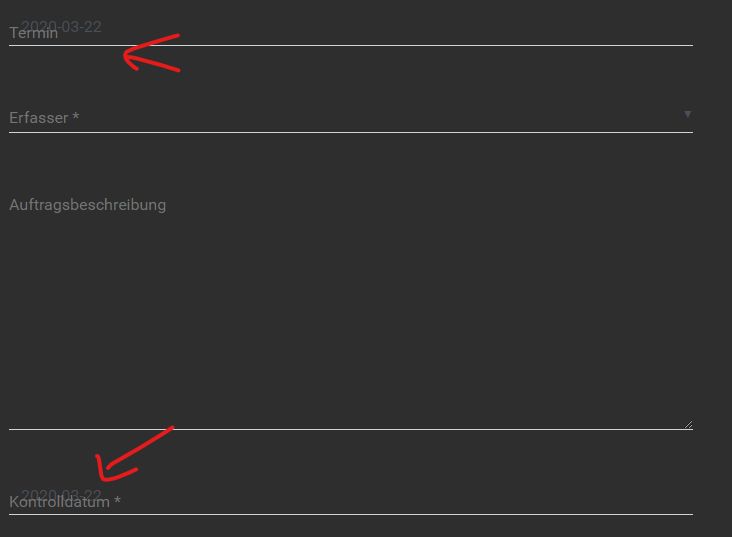

Here is the snippet:
https://mdbootstrap.com/snippets/jquery/custer/1908087
I type in: 25.03.2020 and after typing in it changes to 2020-03-25. This didn't happen some months ago. It alway worked properly.
I don't know if this is really a problem of mdbootstrap.
I use the chrome browser version 80.0.3987.149.
Thanks.
Best regards
Mateusz Łubianka staff commented a year ago
The date format is changing to correct submit format."The HTML5 date input specification (https://www.w3.org/TR/2011/WD-html-markup-20110405/input.date.html) refers to the RFC 3339 specification (https://tools.ietf.org/html/rfc3339), which specifies a full-date format equal to: yyyy-mm-dd. See section 5.6 (https://tools.ietf.org/html/rfc3339#section-5.6) of the RFC 3339 specification for more details."
Best,
Custer pro premium commented 11 months ago
@Mateusz Łubianka Thanks for your answer. I just don't understand why this has changed. Before it worked and showed the date like 25.03.2020.
What about the label not moving up?
Best regards
Custer
Grzegorz Bujański staff commented 11 months ago
Hi. I check your snippet again, and label is moving up. How can I reproduce this issue?
Custer pro premium commented 11 months ago
It's only a problem if the value is already filled out. I changed the snippet, now there's the problem, check it again :)
Grzegorz Bujański staff commented 11 months ago
Your right. I add this to our to-do list. We'll fix it.
Custer pro premium commented 10 months ago
Still not fixed. When can we expect that?
Best regards
Custer
Grzegorz Bujański staff commented 10 months ago
We will try to fix it as soon as possible
Still the same Problem after 9 months! Even with the newest version 4.19.2.
It's really disappointing to pay for something, that is not working great, or isn't fixed in a acceptable period. Also the further development of the mdbootstrap 4 is very bad atm.
Is there any workaround?
Marcin Luczak staff commented 4 months ago
Hi [@Custer](/profile/?id=65125),
I am sorry for that inconvenience. We will check why this has not been resolved yet. For now please use this workaround:
$(document).ready(function() {
  if($('#termin').val() !== '') {
     $('label[for=termin]').addClass('active');
    }
});
Please also see this working with your previous snippet: https://mdbootstrap.com/snippets/jquery/marcin-luczak/2801423
Regards, Marcin
Custer pro premium commented 3 months ago
Hello Marcin
Thanks for your answer and your workaround. Hope it will be fixed soon :)
Best regards
Custer
Open
- User: Pro
- Premium support: Yes
- Technology: jQuery
- MDB Version: 4.14.1
- Device: Computer
- Browser: Chrome (newest)
- OS: Windows 10 (1903)
- Provided sample code: No
- Provided link: No
Mateusz Łubianka staff commented a year ago
Hi,
please, create a snippet showing your problem here: https://mdbootstrap.com/snippets/. I'll try to help you.
Best,