Topic: NPM Install Issues | Git Repository not found

Expected behavior The pro version is suppose to install with npm.
Actual behavior
Error Code: 128.
Says the project you were looking for could not be found
Resources (screenshots, code snippets etc.)
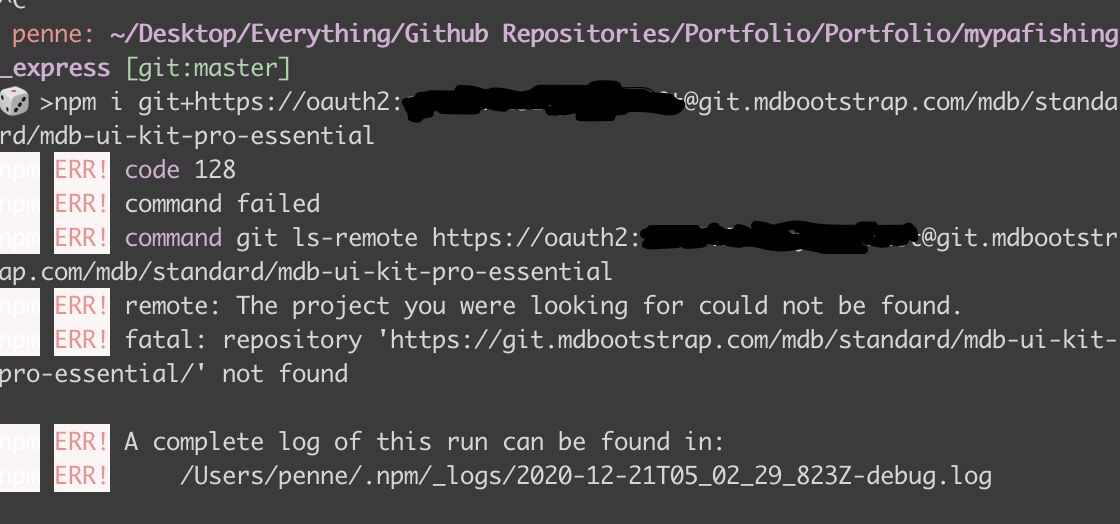

Hi,
This is a common error when you are trying to reach the repository you don't have permission to. As I can see you have purchased MDB Pro for jQuery version and the repository you are trying to reach is for Standard (non jQuery) version. You can download the package assigned to your purchase on your order page.
Regards, Marcin
Seth Pennebaker pro premium commented 3 months ago
thank you, I meant to close this topic an hour or two after posting since i realized i was doing it wrong. thank you for replying!
Marcin Luczak staff commented 3 months ago
I'm glad you've managed to fix it by yourself before my response
Best, Marcin
Resolved
- User: Pro
- Premium support: Yes
- Technology: jQuery
- MDB Version: 4.19.2
- Device: MacBook
- Browser: Chrome
- OS: Big Sur 11.0.1
- Provided sample code: No
- Provided link: No