Topic: Multiselect
Expected behavior I would like to ask how to make the Multi select component to show horizontally? not dropdown as the default
Actual behavior dropdown default
Resources (screenshots, code snippets etc.)

Hi,
do you mean you want to have, eg. to material selects align horizontally or you need to align options after choose horizontally, like here: https://codepen.io/nsuthar0914/pen/pbgxWo. Please, describe your problem in details more clearly. I'll try to help you.
Best, Marta

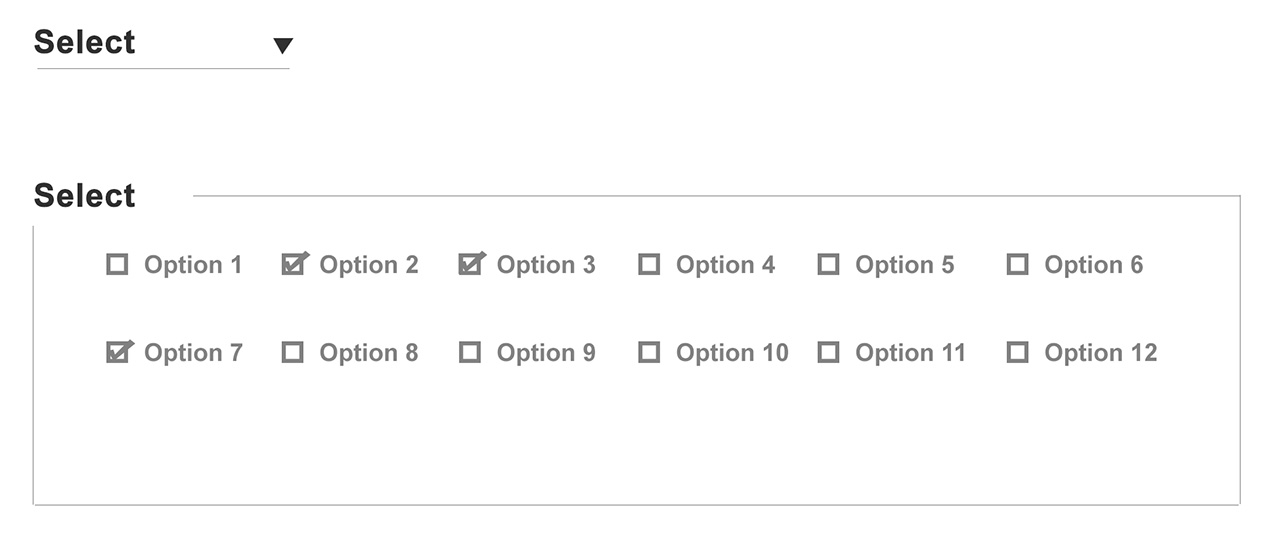
hi this one work but not what i want to achieve try this CSS: .dropdown-content { display: flex; }. that solution only display 1 row and if i add more item it just add on that row
I want something that only 5-6 option in 1 row and when you add more the other option create a new row.
Is this possible? pls. check again my sample screenshot i want to achieve
kind regads
Hi,
we don't have two rows option for select. I added this idea to our tasks board and we will think about create such a select.
Best,Marta
dcoderk commented 2 years ago
not just two rows it add more row when you add more option is that possible?
actually not just two rows when you add more option it add more row so it gonna be 5-6 column with unlimited row
looking forward on that
Hi,
fine, I understand. We will try to create something like this.
Best, Marta
dcoderk commented 2 years ago
ok looking forward on that
thank you
Marta Szymanska staff pro premium commented 2 years ago
You're welcome.
Hi,
At the moment I can offer you this solution: https://mdbootstrap.com/snippets/jquery/marta-szymanska/562030?view=standard or this https://mdbootstrap.com/snippets/jquery/marta-szymanska/561988?view=standard. With our current javascript code of Material Select and Multiselect, I can't provide anything more with not doing significant changes.
Best, Marta
Answered
- User: Free
- Premium support: No
- Technology: jQuery
- MDB Version: 4.7.4
- Device: mobile, desktop
- Browser: chrome,firefox,opera
- OS: ubuntu 18.04, windows, mac
- Provided sample code: No
- Provided link: No