Topic: mdb-select not posting values and not accessible in page

Expected behavior I have two mdb-select components on the page. I want to post both of the values to the server from a form and disable one or the other depending in some instances.
Actual behavior The first is posting values to the server and I'm able to disable it in client side code but the second select is not accessible to disable on the client side and does not post values to the server. In this instance the ColourGroup select (as in the images) does not seem to post values or be accessible in client side script. They work if I just use normal input selects though.
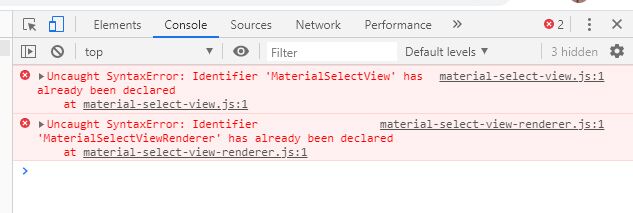
In addition there seems to be an error with every page that includes the material-select-view and material-select-view-renderer .js files in (screenshot included). If I remove the mdb.js then the errors go but that leads to a bunch of other errors?
Any help would be appreciated.
Resources (screenshots, code snippets etc.)


Hi,
please, create a snippet showing your problem here: https://mdbootstrap.com/snippets/. I'll try to help you.
Best,
Hi Mateusz,
In recreating the problem I added all the files again from the archive and all the errors were cleared up. Not sure if I added the material-select*.js files from another distribution but everything works now, no errors in developer tools so apologies for the time wasted, I must've had older versions of the files in the project.
Cheers Shaun
Mateusz Łubianka staff commented a year ago
I´m glad that everything is alright :) Feel free to ask your questions.
Best,
Answered
- User: Free
- Premium support: No
- Technology: jQuery
- MDB Version: 4.11.0
- Device: laptop
- Browser: chrom
- OS: windows 8
- Provided sample code: No
- Provided link: No