Topic: Material select onchange doesn't fire again
Expected behavior
The onchange event should fire every time I change the material-select.
Actual behavior
If I chose an option in the material-select "oertlichkeit", it fills the material-select "ort" with some values. If I change the material-select "oertlichkeit" again, before I chose a value in material-select "ort", it fires the onchange event again and it works. But as soon as I chose a value in the material-select "ort", and then change the material-select "oertlichkeit" again, it doesn't fire the onchange event anymore.
Some versions ago, it worked normally. And it also works in an older bootstrap version. Where's the problem?
The whole code is in the snippet.
Resources (screenshots, code snippets etc.) https://mdbootstrap.com/snippets/jquery/custer/2204357

I tried another solution with ajax and javascript (append the elements in a for loop). There's exactly the same problem. I really think there's a problem with the material-select.
Grzegorz Bujański staff commented 9 months ago
It's hard to tell me what's wrong without seeing the code. I need a working example to see what's going on. I was able to remove previous options, choose new ones from api and upload to material selecta. See here: https://mdbootstrap.com/snippets/jquery/grzegorz-bujanski/2216279. Maybe in your case it is enough to call the destroy method on material select and initialize select again after loading new data?
Custer pro premium commented 9 months ago
You're great! That was the solution :) Destroy, fill and reinitialize.
Thank you very much :)
Changed code: function fetch_select(val) { $.ajax({ type: "POST", url: 'dydropdown_data.php', data: { get_option:val }, success: function (response) { var html = ""; //Variable html Fügt zusätzlich leeres ein bei DropDown Feld
// Material Select Destroy
$('#ort').materialSelect({
destroy: true
});


document.getElementById("ort").innerHTML=html + response;

// Material Select Initialization
$('#ort').materialSelect();
}
});
}
Best regards
Custer
Grzegorz Bujański staff commented 9 months ago
I'm glad I could help you solve this problem :) Best, Grzegorz.
Hi No there is not really an error in the console about that:
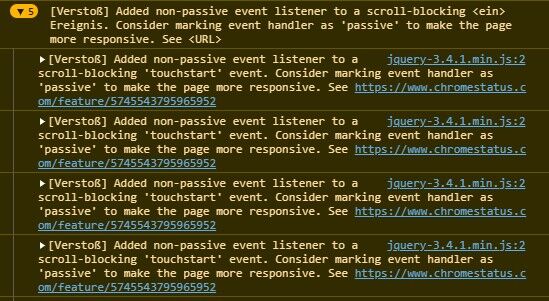
It's strange that it works, as long as I do not chose any option in the second select-element.
If I chose an option in the second select element "ort", there is no activity anymore in the console, if I change the select "oertlichkeit".
Thanks!
Best regards
Custer
As I could test now, the onchange event fires, even after changing de second select "ort". But the select "ort" does not get the new options, after chosing once an option.
I compared now the select and the html. And I noticed, that all the ajax stuff and the innerhtml replacement works. But the select does not refresh and show the new options. How can this be? What's the problem?
- I choosed an option in select1 "oertlichkeit".
- I choosed an option in select2 "ort".
- Then changed the option in select1 "oertlichkeit"
The result is: The html changes correctly, but the select does not show the new options. As it would not refresh.
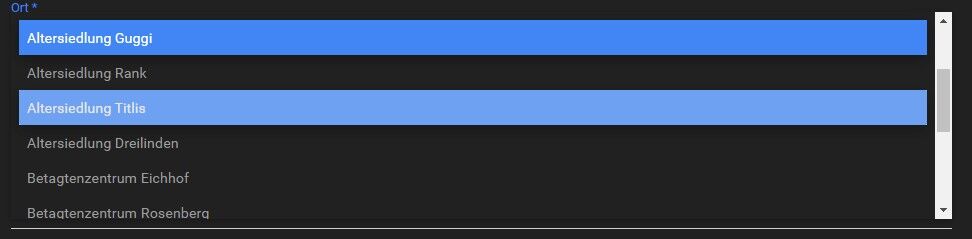
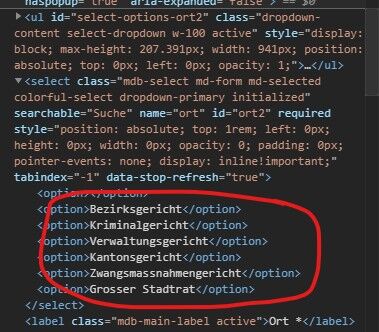
Compared again an I found the problem in the html code:
https://mdbootstrap.com/snippets/jquery/custer/2209381
The options are correctly changed. But there is still html-code that has not changed, above the option tags.
For example this:
Seebrücke
Answered
- User: Pro
- Premium support: Yes
- Technology: jQuery
- MDB Version: 4.19.0
- Device: Computer
- Browser: Chromium Edge / Chrome
- OS: Windows 10 (1909)
- Provided sample code: No
- Provided link: Yes
Grzegorz Bujański staff commented 10 months ago
Hi. Unfortunately I can't reproduce this error. I tried in several ways but it always worked. Do you have any errors in the console?
Custer pro premium commented 9 months ago
See my answers below :)