Topic: Material Select "Empty option" is too small
Expected behavior The "Empty Option" choice should be as big as the options that are not empty.
Actual behavior The "Empty Option" choice is too small. Hardly to find for an user.
Resources (screenshots, code snippets etc.)
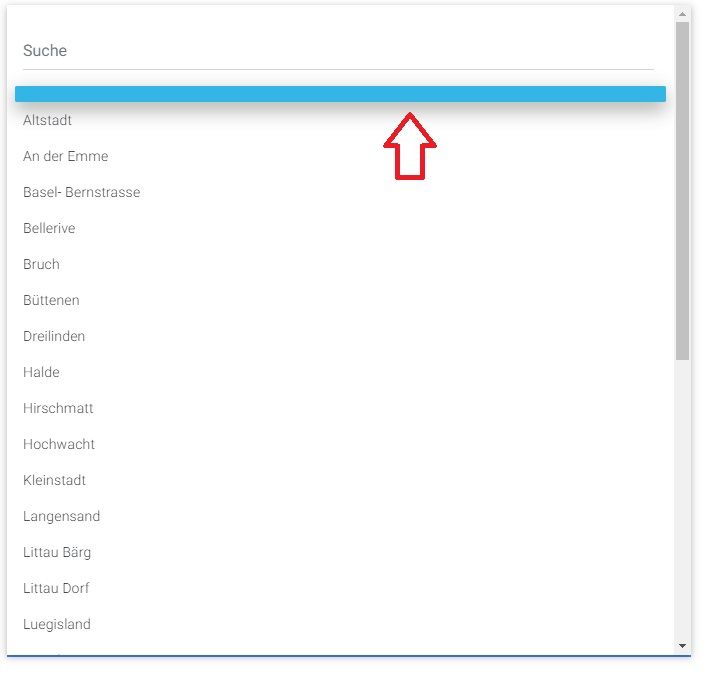

Hello!
Maybe try to set static height of each dropdown element in CSS? If you tried to and it gave no result, can you put your code into snippet? It'll be helpful

Hi, sorry I've no idea how to do this. I tried some styling directly to the option-tag, without any succes. I tried padding, height and font-size.
Here's my code:
<div class="row">
                <div class="col-12">
                    <select class="mdb-select md-form md-selected colorful-select dropdown-primary" searchable="Suche" name="einsatzleiter" required>
                    <option></option>
                    <?php
                        getDropdownAndCheck("tbl_Mitarbeiter", "Name", $einsatzleiter);
                    ?>
                    </select>
                    <label class="mdb-main-label">Einsatzleiter *</label>
                </div>
            </div>
Just put .filtrable {
height: 40px !important;
} to your CSS, you can change number of height pixels if you want to make your option look taller or smaller.
Just put .filtrable { height: 40px !important; } to your CSS, you can change number of height pixels if you want to make your option look taller or smaller.
This answer worked for me. I used 35px and now the empty option looks like the filled options. Perfect!
Thank you very much :)

You can just set as the first option text
<select class="mdb-select md-form">
<option value=""> </option>
<option value="1">First</option>
<option value="2">Second</option>
</select>
Answered
- User: Pro
- Premium support: Yes
- Technology: jQuery
- MDB Version: 4.8.4
- Device: Computer
- Browser: Chrome
- OS: Windows 10
- Provided sample code: No
- Provided link: No