Topic: Input Animation

Expected behavior
label should animate to top corner
Actual behavior
I have a page where i have a modal popup with prepopulated input elements but when i populate a text input via
document.getElementById("inputnamehere").value = "test"
and then show the modal the animation is stuck on the input field, if i click the field the animation puts it on the top corner like it should be from the start .. is this a bug or can i trigger the animation somehow?
code for one of my inputs is as follow:
<div class="form-row">
                        <div class="col-md-12 md-form">
                            <label for="editArticleNumberInput">Artikel</label>
                            <input type="text" id="editArticleNumberInput" class="form-control" value="artikel" readonly required>
                        </div>
                    </div>
Resources (screenshots, code snippets etc.)
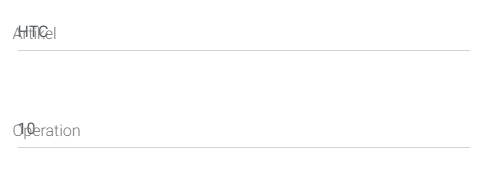

I had the same problem. But fixed it by adding the active class to the label on document ready. See fix below:
https://mdbootstrap.com/snippets/jquery/nsnyder1992/1940468
Hopefully this helps anyone that had the same problem

Hi,
would you show a live demo of the problem in the snippet here: https://mdbootstrap.com/snippets/? I'll try to help you.
Best, Marta
Answered
- User: Pro
- Premium support: Yes
- Technology: jQuery
- MDB Version: 4.8.10
- Device: PC
- Browser: Chrome
- OS: Windows 10
- Provided sample code: No
- Provided link: No