Topic: Horizontal stepper not showing all elements on screen

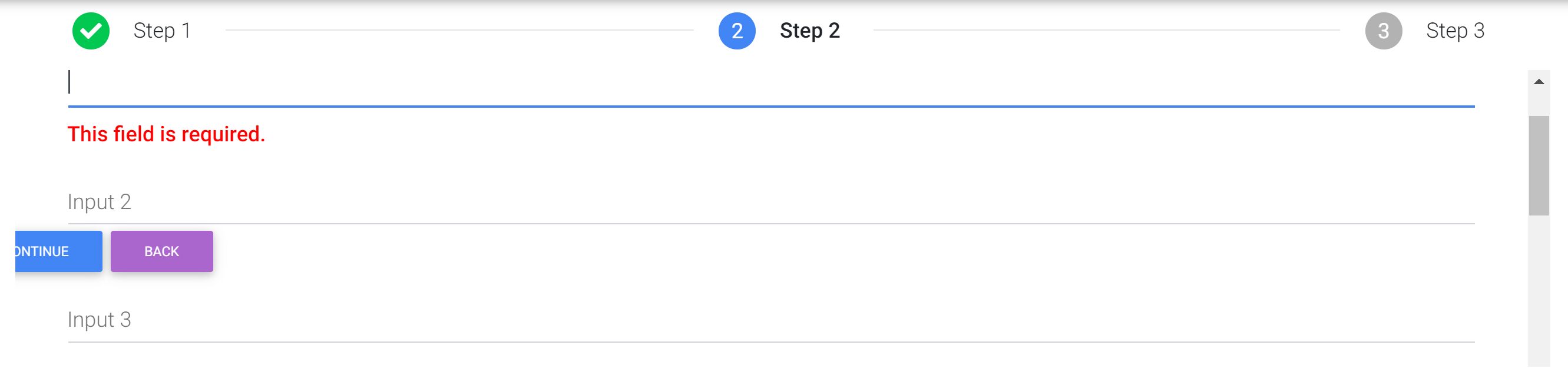
I am using the example for 'horizontal snippet' off the website. I have included the relevant steppers.css and steppers.js files, with the MDB pro version. Nothing else has been added apart from additional fields on the second step to have more than one element.
In the snippet you can also see that the buttons are in the middle of the input fields rather than at the bottom of the last element.
Expected behavior The expected behaviour is that the second step will not have a scroll bar within the view, but simply scroll (if required) using the browser navigation.
Resources (screenshots, code snippets etc.) https://mdbootstrap.com/snippets/jquery/jdkneebone/1623717

Hello,
You can add "horizontal-fix" class:
<ul class="stepper horizontal horizontal-fix" id="horizontal-stepper">

Answered
- User: Pro
- Premium support: Yes
- Technology: jQuery
- MDB Version: 4.11.0
- Device: Desktop
- Browser: Chrome
- OS: Windows
- Provided sample code: No
- Provided link: Yes