Topic: Height of fixed button

I noticed this issue when installing the new version, after having used 4.7the Fixed button container has a height of 500px.which means it covers other buttons or menu item (or anything, really) that happen to be within 500 pixels of it (which could land up to b a lot!)
Here is the snippet, based on your basic setup (no changes made by me): https://mdbootstrap.com/snippets/jquery/moshe/2084785
Screenshot: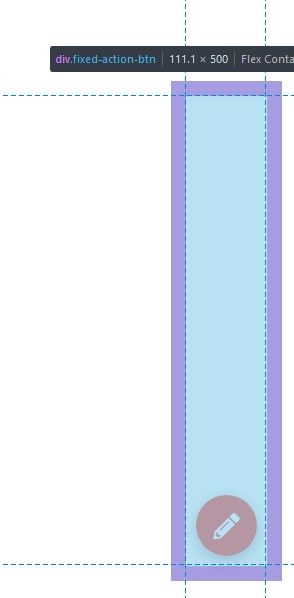
and here is a screenshot from my own app, where you can see how this massive height covers menu items and potentially anything above it:
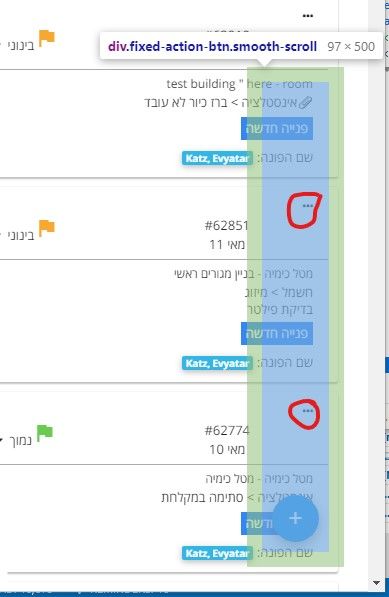
My code:
<div class="fixed-action-btn smooth-scroll" style="bottom: 25px; right: 24px;">
<a href="ticket_entry" class="btn-floating btn-large blue  waves-effect waves-light"><!-- waves-effect-->
    <i class="material-icons">add</i>
</a>
What can be done to fix this?
Thanks

Hi,
I have the same issue - when do you plan to fix it? MDB PRO 4.19.0 (jquery)
Piotr
Grzegorz Bujański staff commented 10 months ago
Hi. This will be fixed in the next release
daunus pro commented 9 months ago
Great: works fine in MDB PRO 4.19.1
Thanks!
Grzegorz Bujański staff commented 9 months ago
You're welcome :)
Answered
- User: Pro
- Premium support: No
- Technology: jQuery
- MDB Version: 4.18.0
- Device: PC/Mobile
- Browser: Chrome/Firefox
- OS: Win10/Android
- Provided sample code: No
- Provided link: Yes
Grzegorz Bujański staff commented 11 months ago
Hi. We don't have any workaround solution at this moment. We have this issue in ours to do list.
Kneidels pro commented 11 months ago
Thanks. what about changing the height to 100px ....?
Grzegorz Bujański staff commented 11 months ago
This is a solution that we are considering but needs to be implemented and tested