Topic: btn-outline-secondary
As reported at the following link Buttons, the border and text color for btn-outline-secondary are
color: #a6c !important;
background-color: transparent !important;
border: 2px solid #a6c !important;
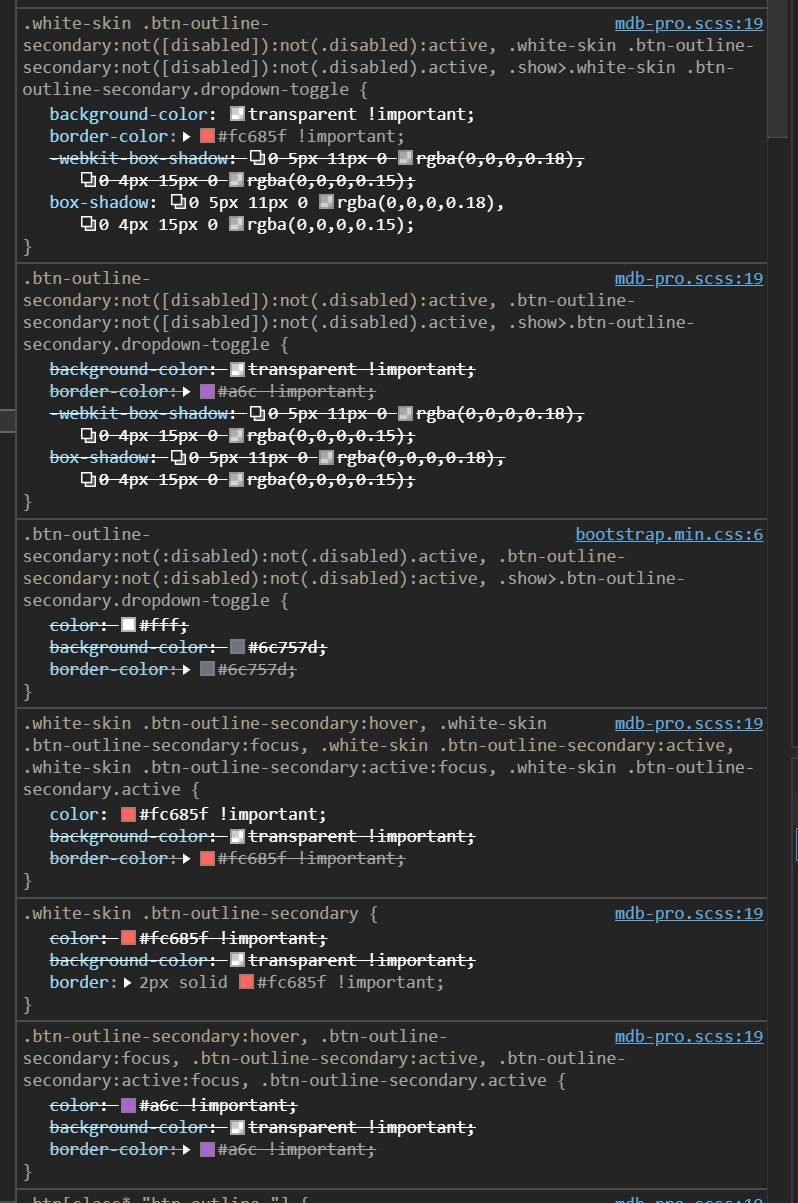
Using same class I get these
color: #fc685f !important;
background-color: transparent !important;
border: 2px solid #fc685f !important;

Looking at full styles informations, the problem seems related to the .white-skin class
Grzegorz Bujański staff commented 8 months ago
If you use the white skin, the default colors also change. If you want to prevent this behavior, do not use skin
Answered
- User: Free
- Premium support: No
- Technology: jQuery
- MDB Version: 4.19.1
- Device: PC
- Browser: Edge
- OS: Windows 10 2004
- Provided sample code: No
- Provided link: Yes
Grzegorz Bujański staff commented 8 months ago
Hi. Have you not overwritten .btn-outline-secondary?
AlessioB commented 8 months ago
No, I don't changed anything