Topic: Change Stepper icon and completed step

Expected behavior
I want to change the "icon" or design in the step to this:

Actual behavior I am able to change the style of the step, but, how can I? -remove the text, -change the "icon" to a double circle and -mark as completed like the image and not like the green one
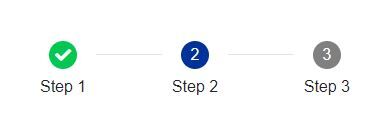
Resources (screenshots, code snippets etc.)

Currently, it's not possible to completely change the step icon. This is already on our to-do list, but we can't provide an ETA for this feature.
Answered
- User: Pro
- Premium support: Yes
- Technology: Angular
- MDB Version: 9.3.1
- Device: Computer
- Browser: Edge
- OS: Windows
- Provided sample code: No
- Provided link: No