Topic: Angular Sticky Table Header
Are the API's for the MdbTableEditorDirective and MdbTableDirective compatible? I was attempting to utilize the bordered, hover, responsive, and stickyHeader inputs mentioned in the MdbTableDirective documentation on the MdbTableEditorDirective to no avail. I was thinking that it would have all the functionality of base MdbTableDirective and more.
Can/should I use them alongside each other?
If the inputs are unavailable for the MdbTableEditorDirective, could I manually add the classes they apply? If so, could I have an example?
Thanks! Jordan

Dear @Jordan
Your stickyHeader is not visible when scrolling, because it is covered by your navigation bar.
You have two options here:
1) Remove fixed-top from navbar
2) Add some space between stickyHeader and fixed-top navbar
Hope it helps!
Best Regards, Bartosz.
Jordan pro premium priority commented a year ago
That does help. I was thinking it would recognize the other sticky content like with the sticky after input.

Is there an update on this?
Damian Gemza staff commented a year ago
Dear @Jordan
Sorry for late response!
You can use mdbTable directive with mdbTableEditor without any problem.
The mdbTableEditor directive haven't got inputs from mdbTable, so you have to add this directive to use inputs like bordered, responsive, stickyHeader and other.
Best Regards,
Damian
Jordan pro premium priority commented a year ago
No worries. Even when I use the mdbTable directive with the stickyHeader input, the header does not remain static when scrolling the page.
Would there be any interference from other sticky content on the page? I am also using the sticky and stickyAfter directive on the page.
Arkadiusz Idzikowski staff commented a year ago
Could you paste here an example html/ts code so we can debug this problem on our end?
Jordan pro premium priority commented a year ago
Posted below.....
<table #fieldSelectionTable="mdbEditor"
                   (rowHighlight)="fieldSelectionHighlightedRow = $event"
                   [itemsPerPage]="visibleItems"
                   class="table table-hover table-hr-data-row"
                   mdbTableEditor

                   mdbTable
                   stickyHeader="true"
                   stickyHeaderBgColor="#303030"
                   stickyHeaderTextColor="#ffffff">

              <thead>
                <tr>
                  <th *ngFor="let head of fieldSelectionHeadElements; let i = index"
                      scope="col">
                    {{head}}
                  </th>
                </tr>
              </thead>
              <tbody *ngIf="(requestFieldSelectionFinishedLoading | async)">
                <tr #tableRow
                    *ngFor="let item of fieldSelectionTable.performSearch(''); let i = index">
                  <td [ngClass]="{'tr-selected-row-highlight': item.isRequested}">{{item.dataEntityDescription}} </td>
                  <td [ngClass]="{'tr-selected-row-highlight': item.isRequested}">{{item.fieldDescription}} </td>
                  <td [ngClass]="{'tr-selected-row-highlight': item.isRequested}">
                    <mdb-checkbox (change)="updateIsRequested(item.fieldId,$event)"
                                  [value]="item.isRequested"
                                  class="form-control">
                    </mdb-checkbox>
                  </td>
                  <td [ngClass]="{'tr-selected-row-highlight': item.isRequested}">
                    <mdb-checkbox (change)="updateIsStoredInApp(item.fieldId,$event)"
                                  [value]="item.isStoredInApp"
                                  class="form-control">
                    </mdb-checkbox>
                  </td>
                  <td [ngClass]="{'tr-selected-row-highlight': item.isRequested}">
                    <mdb-checkbox (change)="updateIsFedToOtherApp(item.fieldId,$event)"
                                  [value]="item.isFedToOtherApp"
                                  class="form-control">
                    </mdb-checkbox>
                  </td>
                  <td [ngClass]="{'tr-selected-row-highlight': item.isRequested}">
                    <mdb-checkbox (change)="updateIsFedToThirdParty(item.fieldId,$event)"
                                  [value]="item.isFedToThirdParty"
                                  class="form-control">
                    </mdb-checkbox>
                  </td>
                  <td [ngClass]="{'tr-selected-row-highlight': item.isRequested}">{{item.refDataType.dataType}} </td>
                  <td [ngClass]="{'tr-selected-row-highlight': item.isRequested}">{{item.refAccessSensitivity.accessSensitivity}} </td>
                </tr>
              </tbody>
            </table>
Dear @Jordan
Your example seems to work as it should (tested in a ng new app):
<table
  class="table table-hover table-hr-data-row"
  mdbTableEditor
  mdbTable
  stickyHeader="true"
  stickyHeaderBgColor="#303030"
  stickyHeaderTextColor="#ffffff"
>
  <thead>
    <tr>
      <th *ngFor="let head of headElements; let i = index" scope="col">
        {{ head }}
      </th>
    </tr>
  </thead>
  <tbody>
    <tr *ngFor="let el of elements">
      <th scope="row">{{ el.id }}</th>
      <td>{{ el.first }}</td>
      <td>{{ el.last }}</td>
      <td>{{ el.handle }}</td>
    </tr>
  </tbody>
</table>
TS
  elements: any = [
    { id: 1, first: 'Mark', last: 'Otto', handle: '@mdo' },
    { id: 2, first: 'Jacob', last: 'Thornton', handle: '@fat' },
    { id: 3, first: 'Larry', last: 'the Bird', handle: '@twitter' },
    ....

  ];


  headElements = ['ID', 'First', 'Last', 'Handle'];
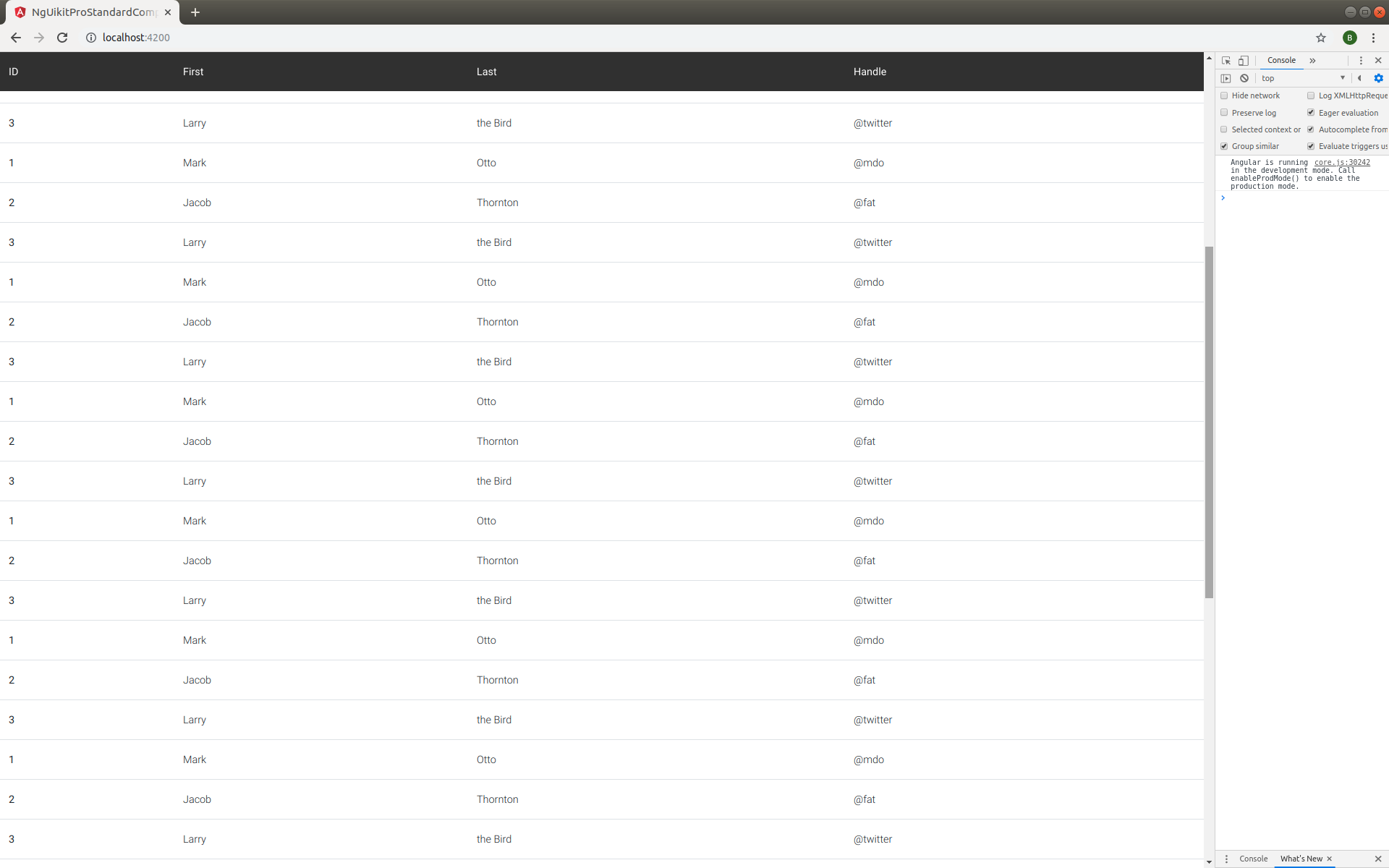
as you mentioned - maybe there are any interference from other sticky content on the page. Could you send some demo app with existing problem on my email - b.termena@mdbootstrap.com ?
Best Regards, Bartosz.
Jordan pro premium priority commented a year ago
Email sent. Thanks!
Bartosz Termena staff commented a year ago
Hi! I haven't received your email. Could you send it again?
Best, Bartosz.
Jordan pro premium priority commented a year ago
Resent. Thanks!
Bartosz Termena staff commented a year ago
Hi,
Gmail blocks messages that may spread viruses, like messages that include executable files or certain links. Please send your demo app via google drive.
Best Regards, Bartosz.
Jordan pro premium priority commented a year ago
Resent with Google drive
Dear @Jordan
I looked at your code, and i think the header does not remain static when scrolling the page when parent div of table has table-responsive class.
In your example you have:
 <div class="row">
          <div class="col-12">
            <div class="table-responsive">
              <table #requestNonProdSupportGroupTable="mdbEditor"
                     (rowHighlight)="requestNonProdSupportGroupHighlightedRow = $event"
                     [itemsPerPage]="visibleItems"
                     class="table table-hover"
                     ......
Try get rid of this table-responsive class.
We will take a closer look at this problem. Please let me know if your problem disappears after removing this class.
Hope it helps!
Best Regards, Bartosz.

Answered
- User: Pro
- Premium support: Yes
- Technology: Angular
- MDB Version: 8.5.0
- Device: PC
- Browser: Chrome
- OS: Windows 10
- Provided sample code: No
- Provided link: No