
Author: Damian Gemza
Working with Firebase & IndexedDB databases
It is time to take advantage of the benefits of databases. In this lesson, we will focus on using two databases — Firebase and IndexedDB. At the end of this lesson your application will use the Firebase database to get data into the application, and in offline mode, it will use a data caching mechanism and IndexedDB.
In the app.component.html file, we have to change the *ngFor loop
that generates the schedule-item
components. In this line, we have to add an | async pipe. To do this, open this file and change the line below to the following one.
        <div *ngFor="let item of items">
          <app-schedule-item [value]="item"></app-schedule-item>
        </div>
        <div *ngFor="let item of items | async">
          <app-schedule-item [value]="item"></app-schedule-item>
        </div>
The file app.component.ts we have to rebuild in its entirety. To do this, paste the
code below
into this file:
        import {Component, OnInit, ViewChild} from '@angular/core';
        import {ModalDirective} from 'angular-bootstrap-md';
        import {FormControl} from '@angular/forms';
        import {IdbService} from './services/idb.service';
        import {FirebaseService} from './services/firebase.service';
        import {AngularFirestore} from '@angular/fire/firestore';
        import {Observable, of} from 'rxjs';
        import {map} from 'rxjs/operators';

        export interface Schedule {
          id?: string;
          time: string;
          subject: string;
          location?: string;
          description?: string;
        }

        @Component({
          selector: 'app-root',
          templateUrl: './app.component.html',
          styleUrls: ['./app.component.scss']
        })
        export class AppComponent implements OnInit {
          @ViewChild(ModalDirective) modal: ModalDirective;

          timeInput = new FormControl();
          subjectInput = new FormControl();
          locationInput = new FormControl();
          descriptionInput = new FormControl();

          networkMode = 'online';
          items: Observable<Schedule>;

            constructor(
            private idbService: IdbService,
            private firebase: FirebaseService,
            private db: AngularFirestore) {
              navigator.onLine === true ? this.networkMode = 'online' : this.networkMode = 'offline';

              this.idbService.connectToIDB();
              let onlineDataLength;

              this.idbService.getAllData('Items').then((items: any) => {
                onlineDataLength = items.length;
                if (this.networkMode === 'online' && onlineDataLength === 0) {
                  this.items = this.db.collection<Schedule>('Items', item => item.orderBy('time', 'asc'))
                    .snapshotChanges().pipe(map((actions: any) => {
                      return actions.map(a => {
                      const data = a.payload.doc.data() as any;
                      this.idbService.addItems('Items', data);
                      return {...data};
                    });
                    }));
                    } else {
                    this.items = of(items);
                  }

                  this.idbService.dataChanged().subscribe((data: any) => {
                    this.items = of(data);
                  });
                });
              }

              addNewItem() {
                const value: Schedule = {
                  id: null,
                  time: this.timeInput.value,
                  subject: this.subjectInput.value,
                  location: this.locationInput.value,
                  description: this.descriptionInput.value
              };

              if (this.networkMode === 'offline') {
                this.idbService.addItems('Sync-Items', value);
                this.idbService.addItems('Items', value);
              } else if (this.networkMode === 'online') {
                this.idbService.addItems('Items', value);
                this.idbService.getAllData('Items').then((data: any) => {
                  this.firebase.addItem({
                    id: data.length,
                    time: value.time,
                    subject: value.subject,
                    location: value.location,
                    description: value.description
                });
              });
              }

              this.timeInput.setValue('');
              this.subjectInput.setValue('');
              this.locationInput.setValue('');
              this.descriptionInput.setValue('');

              this.modal.hide();
              }

              getOnlineData() {
                return this.idbService.getAllData('Items');
              }

              getOfflineData() {
                return this.idbService.getAllData('Sync-Items');
              }

              mergeDatabases() {
                let offline;
                let online;

                this.getOfflineData().then((data: any) => {
                  offline = data;
                });
                this.getOnlineData().then((data: any) => {
                  online = data;
                offline.forEach((el: any, index: number) => {
                  if (el == offline[index]) {
                    this.firebase.addItem(el);
                    this.idbService.addItems('Items', el);
                    this.idbService.deleteItems('Sync-Items', el.id);
                  }
                });
              });
              }

              ngOnInit() {
                if (this.networkMode === 'online') {
                  this.mergeDatabases();
                }
              }

            }
Let's describe the changes that have occurred in this file:
In the items variable we changed the type to Observable<Schedule>,
so we can use as async pipe while generating the schedules list.
In the constructor we injected three services: IdbService,
FirebaseService, and AngularFirestore.
Then in the constructor we used the this.idbService.connectToIDB() method to
connect to the IndexedDB
database, and then we used the this.idbService.getAllData() method to retrieve data from the
IndexedDB database.
In the this.idbService.getAllData() Promise we check if the application is
running online, then we retrieve data
from the Firebase database and assign it to the items variable. Otherwise, we use the of
operator from the RxJS library
to create observable data from the IndexedDB database and assign it to the items variable.
The last step in the constructor is to subscribe to the
this.idbService.dataChanged() method in order to
assign new data to the items variable each time.
In the addNewItem() method we added some code that checks if the application is running offline or
online, and based
on this check adds data to the offline (indexedDB) or online (Firebase) database.
In the ngOnInit hook we use the mergeDatabases() method to transfer
the data added offline (IndexedDB) to the online database (Firebase).
Now you can build your application using the npm run pwa command, then open your
browser at localhost:8080 and see how it works.
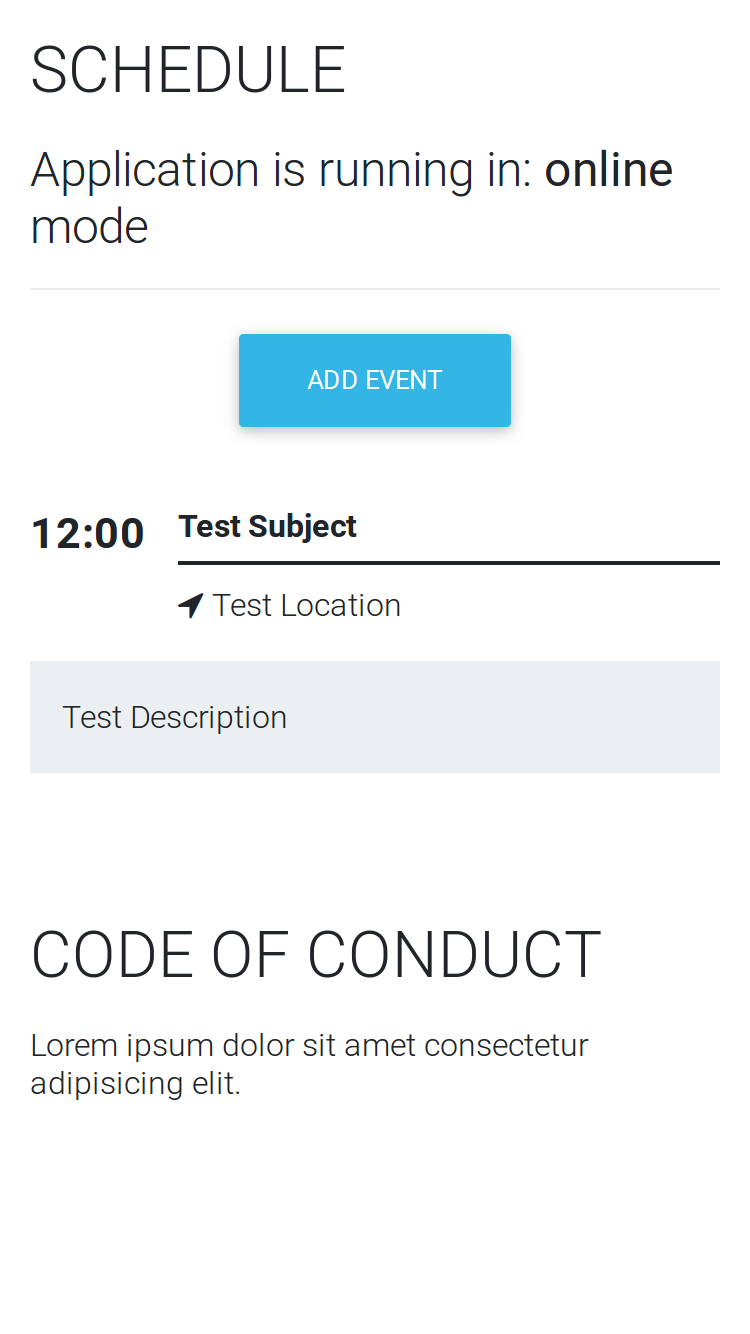
Your application should display one test schedule, and should look like in the picture below:
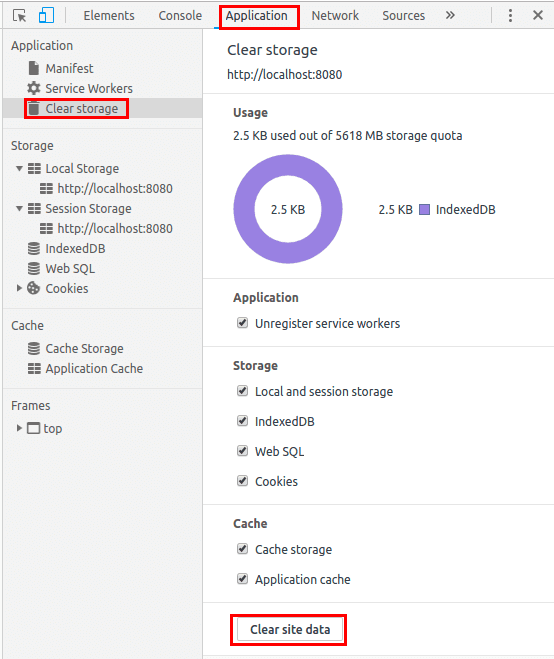
However, if your application reads old or incorrect data, clear the Cache data and IndexedDB data in your browser. Open Developer Tools (F12), then open the Application menu, click on the Clear storage button and then click the Clear site data button. The picture below shows how to do it in Google Chrome.
We then need to check the operation of the application! Run it with the npm
run pwa
command, and see how it works in online and offline modes.
Switch the application to offline mode, add a new schedule, then switch it back to offline mode and refresh. You'll see that the data added offline is online!
Is it working for you? If not, you can check the code for this lesson on our repository
Previous lesson Download Next lesson
Spread the word:
