Topic: launch any gulp mdb-go files from Mac top nav (Mac osX only)


Here's a simple AppleScript that launches gulp mdb-go. Any gulp mdb-go file on your computer with just a little help from you. The script sits in the top menu bar so is accessible from just about anywhere on your Mac.
Finished looks like this:
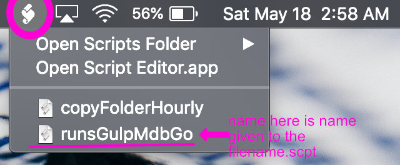
And what opens is a list box with paths to the parent folder to the gulp file.js The same folder to ctrl-click to launch terminal . This script launches terminal but requires no input on your part until you want to stop terminal ...then exit terminal like you normally do (ctrl-c).
List box (select folder and click ok to launch mob-go

To get setup
1. launch Apple Script Editor, should be in Applications/Utilities/ScriptEditor
2. create new blank file (File->New, and it should show AppleScript under the 4 buttons upper left)
3 copy the code at the end of this article into the blank file
4 File -> save (Script format [..scpt]) to ~yourusername/Library/Scripts
give it any name you like. the name minus .scpt is what shows up in top toolbar.
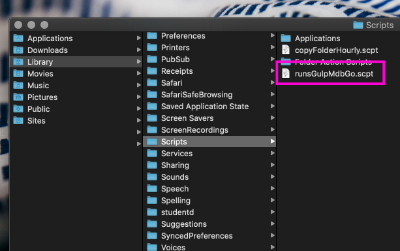
5. Still in Script Editor goto Preferences and turn on the menu bar folder list. my config is shown in the following:

The code also contains the listbox list items. The folder paths are easily gotten when you create a new project folder. Paste the path into the comma delimited line
set projectPaths to {"path/to/folder', "path/to/folder "}
copy path as shown:
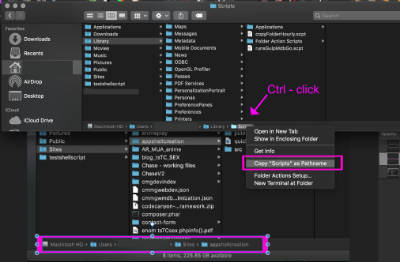
If that footer bar isn't turned on in your Finder goto View->Show Path.
From here out you just need to keep the path list up to date in the .scpt file using Script Editor
Here's the code to copy back in step 3
set theShellScript to "gulp mdb-go"
(* setup simple project list
project name or id to select from display list *)
set projectPaths to {"/path/to/gulp/file", "/path/to/gulp/file", "/path/to/gulp/file" }
choose from list projectPaths with prompt "Select path to launch gulp and vsCode?"
if the result is not false then
set myPath to item 1 of the result
display dialog myPath
end if
set thePath to quoted form of POSIX path of myPath
tell application "Finder"
set myWin to window 1
set theWin to (quoted form of POSIX path of (target of myWin as alias))
tell application "Terminal"
activate
tell window 1
do script "cd " & thePath & "; " & theShellScript
end tell
end tell
end tell
- Category: Miscellaneous
- Specification: Mac osX