Building and Running Applications
Qt Creator provides support for building, running, and deploying Qt applications for desktop environment and mobile devices.
You can set up the following configurations:
- Build configuration, which contains everything you need to compile the sources into binaries.
- Deploy configuration, which handles the packaging and copying of the necessary files to a location you want to run the executable at. The files can be copied to a location in the file system of the development PC or a mobile device.
- Run configuration, which starts the application in the location where it was stored by the deploy configuration.
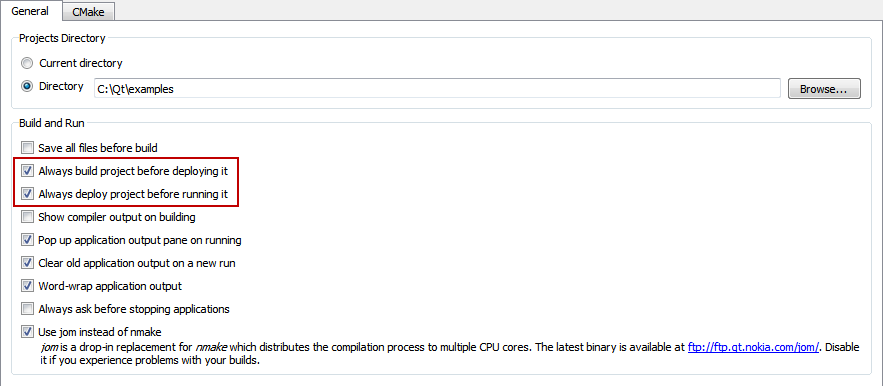
By default, when you select the Run function, Qt Creator builds, deploys, and runs the project. For more information about how to change the default behavior, see Customizing the Build Process.
Setting Up a Project
When you install the Qt SDK, the build and run settings for the tool chains delivered with the Qt SDK are set up automatically.
To view and modify the settings for currently open projects, switch to the Projects mode by pressing Ctrl+5.
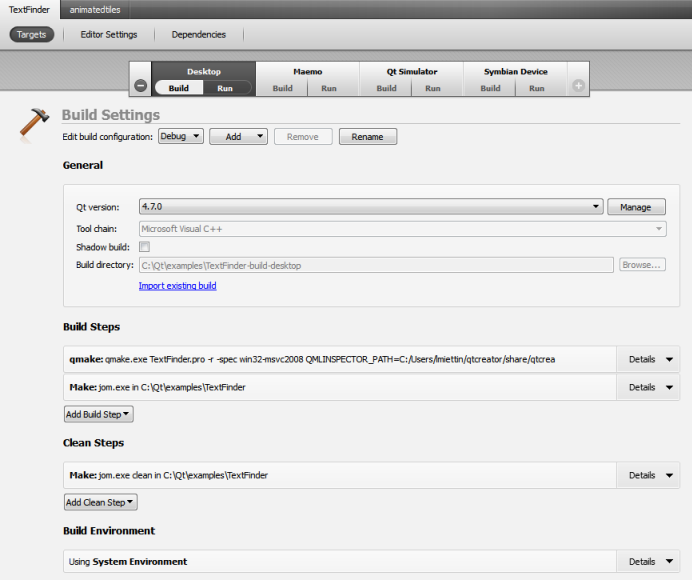
You can add a target if the development environment for the target platform is installed on the development PC and the Qt version is configured. Click  and select from a list of available targets. To remove a target, select it and click
  .
.
You can select the targets and use the Build menu commands to build, deploy, and run projects.
The project pane consists of the following tabs:
- Targets (If you have installed the development environment for only one target, the Targets tab is replaced by a Build tab and a Run tab.)
- Build Settings
- Run Settings
- Editor Settings
- Code Style Settings
- Dependencies
Use the Build and Run buttons to switch between the build and run settings for the active project.
If you have multiple projects open in Qt Creator, use the tabs at the top of the window to navigate between their settings.
Customizing the Build Process
To specify the relationship between the release, build, and deploy configurations, select Tools > Options... > Project. By default, the Always build project before deploying it and the Always deploy project before running it options are enabled. Therefore, when you select the Run function, Qt Creator builds, deploys, and runs the project.